AI-created generic scheduled-feeding scene; not a named-model product photograph or a hands-on test.
The Feeder-Robot makes the most sense for a household that wants scheduled kibble meals and is willing to verify the portions with its own food. Its large hopper and app controls are useful conveniences, but neither proves that a pet ate a meal. Before buying, check the installed dispenser, the hopper insert and whether you will program meals on the physical panel or in the app.
The black Feeder-Robot with smoke-grey hopper is sold under Amazon ASIN B0B6WRY1B9, listed model RF1-1000-BKS. Check Whisker’s documented functions before treating “32-cup, eight-meal” wording as a complete description of the feeding setup. The available capacity and scheduling choices depend on how the unit is configured.
Feeder-Robot: the useful features and their limits
The official Feeder-Robot manual describes three feeding approaches: a schedule set on the control panel, a schedule set through the Whisker app and Gravity Mode. They serve different routines. Choose the mode first, then assess whether its portions and timing match your pet’s established plan.
| Decision | Documented detail | Practical consequence |
|---|---|---|
| Physical-panel schedule | One to four meals per day. | Do not expect eight independently selected app meals from the panel alone. |
| App schedule | Up to eight meals per day. | Confirm the desired schedule has downloaded to the unit. |
| Factory dispenser | 1/8-cup increments, up to 1/2 cup per meal. | Check the installed part and calibrate with the actual kibble. |
| Optional dispenser | 1/4-cup increments, up to one cup per meal. | Do not assume the optional part is included in the chosen bundle. |
| Hopper insert | 25 cups with the insert; 30–32 cups without it for suitable small, round kibble. | Usable capacity follows food shape and dispensing needs. |
| Backup power | An optional battery is described separately. | Check bundle contents; a powered feeder is not automatically battery-backed. |
These figures describe manufacturer settings, not a dietary recommendation. A cup of one food can differ substantially in mass and calories from a cup of another. If the smallest reliable serving does not suit the feeding plan, more scheduling options will not solve that mismatch.
Who should choose the Feeder-Robot?
The strongest fit is a cat or suitable dog already eating compatible kibble on a known routine. An owner can divide that routine into documented serving increments and check the bowl regularly. The app is most useful when it makes schedule management and reminders easier for the person responsible for those checks.
The weaker fit is a pet needing wet or canned food, a household where one animal steals another’s food, or a plan requiring portions finer than the installed dispenser can provide. This is an open food bowl, not an individual access gate. A record of food release cannot tell you which pet ate it.
Consider the Feeder-Robot if you want scheduled kibble meals, can verify the dispenser fitted to the unit, and will check actual food delivery. Skip it if your pet needs wet food, individual access control or a feeding arrangement that cannot tolerate the measured increments available.
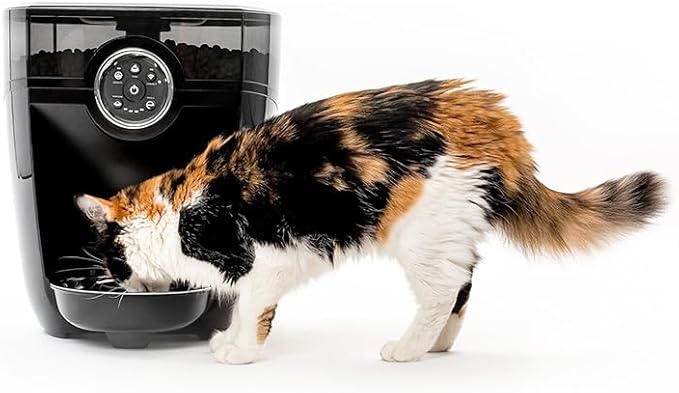
PRODUCT MENTIONED
Whisker Feeder-Robot — Black with Smoke-Grey Hopper
Amazon · Details on the retailer’s website
Why a 32-cup hopper may become a 25-cup hopper
The clear hopper insert is a functional part, not merely packaging to remove for more storage. Whisker’s manual describes it for larger, square or irregular kibble. It lists 25 cups with the insert and about 30–32 cups without it for smaller round food.
Do not choose the higher capacity if the food requires the insert to dispense consistently. The relevant question is whether your kibble moves through the documented setup reliably. A larger amount stored above a problem does not improve the meal that reaches the bowl.
The manual accepts dry or semi-moist kibble no larger than 5/8 inch and excludes wet, canned or moist food. Those terms can be confusing on food packaging. If your food’s size, texture or moisture category is unclear, ask Whisker about the exact product before filling the hopper.
Capacity also does not establish a safe unattended-care interval. Keep food fresh according to its own storage guidance, inspect the hopper and bowl, and arrange a person to check the pet and appliance. Avoid translating the maximum volume into a promise that you can leave an animal alone for weeks.
Match the dispenser to actual meal portions
The factory 1/8-cup dispenser and the optional 1/4-cup dispenser provide different steps and maximum meal sizes. Inspect the delivered equipment and booklet rather than assuming that an optional accessory described online is inside the box. Keep the part identity with your recorded feeding settings.
Use the established daily food amount as the starting point. Collect several supervised releases of the food you actually use and compare their mass with the intended amount. Do not infer grams from the dispenser’s cup label or treat a single unusual release as a complete calibration.
Count manual test food in the day’s feeding total. If several people use the Feed button, agree on who records those additions. A correctly programmed schedule can still produce too much food overall when manual portions, treats and meals from another bowl are ignored.
Panel schedules, app schedules and Gravity Mode
The physical panel and app do not offer identical schedule controls. The manual describes up to four daily panel meals and up to eight app meals. It also explains that the programmed schedule is saved locally, so an already stored schedule can continue if the network connection is lost.
That offline behavior depends on a schedule having reached the feeder and the machine having power and usable food. It is not a guarantee that every remote edit succeeds during an outage. Confirm the saved plan and observe a feed after setup or a significant change.
Gravity Mode is a different choice: the manual describes checking the bowl every six hours and adding food to keep it supplied. It should not be described as a precisely rationed diet. If measured daily intake matters, use an appropriate schedule and verify the food actually delivered instead of relying on a bowl that is repeatedly topped up.
One panel behavior deserves attention before editing: the manual says the initial panel program can dispense immediately, and changing the meal count restarts the timing with another immediate meal. Read the matching instructions before making repeated adjustments. Do not let setup become a series of uncounted extra servings.
App information does not identify who ate
Whisker’s app can support schedule management and appliance notifications. It cannot turn a shared open bowl into exclusive feeding access. In a multi-pet home, watch whether one animal arrives first, blocks the area or finishes food intended for another.
The current published camera-feeder buying guide explains a related distinction: seeing an event and controlling access are separate capabilities. The Feeder-Robot should not be assumed to include a camera or identity gate simply because another feeder has one.
Likewise, low-food and bowl-related alerts describe appliance conditions rather than confirmed pet intake. An apparently successful release is only one part of a feeding check. If appetite changes or a pet repeatedly leaves food, assess the animal’s normal routine and seek veterinary advice when appropriate instead of changing portions based only on an app graph.
Power and placement need their own plan
Use the supplied power arrangement and a firm indoor location with a clear approach to the bowl. Whisker describes an optional backup battery providing approximately 24 hours in power-saving operation. That is a manufacturer estimate for an optional component, not proof that the selected offer includes it or that every outage will last within that period.
Before depending on backup power, confirm the correct battery, its installation and its condition using the model instructions. A local schedule, an internet connection and electrical power are separate dependencies. Failure of one can have a different effect from failure of another.
Fit the bowl correctly as well. The manual shows the narrow end beneath the food-ramp lip; a misplaced bowl can let food build up where it should fall clear. Check the first feeds in person and keep the surrounding floor clean so spills are easy to notice.
Feeder-Robot cleaning still takes hands-on work
Automatic dispensing does not clean the hopper, dispenser or food-contact surfaces. Whisker recommends cleaning before first use and at least monthly afterward, with attention sooner when the condition calls for it. The easiest time is when the hopper and bowl are empty.
The guide distinguishes removable parts that can be hand-washed with mild soap from the electrical base and control panel, which must not be immersed. Disconnect power, follow the documented disassembly, clean the permitted components and let them dry completely before reassembly. Do not pour water into an assembled feeder to rinse the food path.

If dispensing becomes inconsistent, check the configuration and troubleshooting instructions rather than compensating with extra scheduled meals. The manual points to food shape, hopper-insert use, dispenser installation and chute obstruction as different possibilities. Persistent faults warrant support and a reliable supervised feeding alternative.
Check the complete setup before buying
Ask which dispenser and accessories the selected offer includes, whether the actual food is compatible and whether the required schedule is available through the controls you intend to use. Confirm the current seller’s return terms separately; the manufacturer’s direct-store trial wording does not automatically establish another retailer’s policy.
The official Feeder-Robot support and manual page is the appropriate place to keep the current instructions. Match the booklet to the delivered unit before installing an accessory or following a reset procedure.
For a compatible kibble routine with regular owner checks, the black Feeder-Robot with smoke-grey hopper on Amazon is a reasonable option to assess. Its value comes from a configuration that fits the pet, not from filling the largest possible hopper.
Common questions
Does the Feeder-Robot need Wi-Fi to keep feeding?
The manual says a schedule already stored on the unit continues when it goes offline. The feeder still needs working power, compatible food and an unobstructed dispensing path. Verify that the intended schedule has actually been saved.
Does every Feeder-Robot setup hold 32 cups?
No. The manual lists 25 cups with the hopper insert. The higher 30–32-cup figure applies without the insert for suitable smaller round kibble.
Can I program eight meals using only the panel?
The checked guide describes up to four daily meals through the physical panel and up to eight through the app. Choose the schedule method that supports the actual feeding plan.
Does the feeder prove my pet ate a meal?
No. Dispensing and appliance records do not establish ingestion or identify the eater at a shared bowl. Check the bowl and the pet directly.
View Whisker Feeder-Robot — Black with Smoke-Grey Hopper on Amazon.
Comments are reviewed before they appear publicly. Please keep questions and feedback relevant to this article.